Sequences
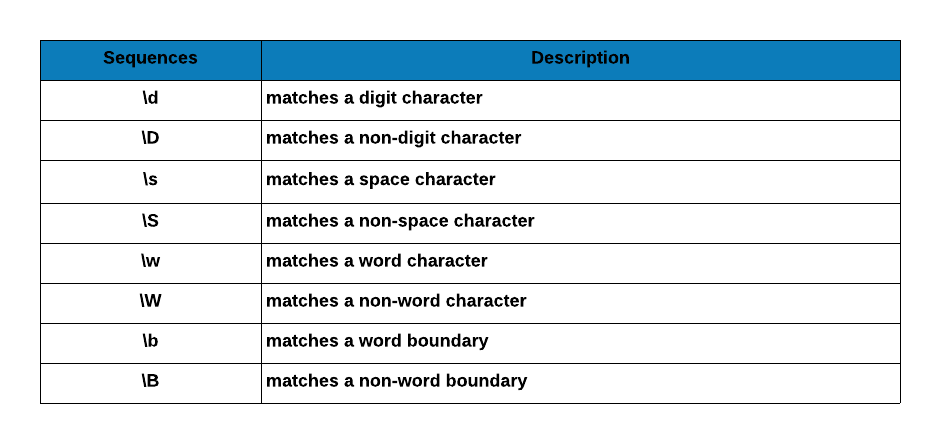
Digit Character
\d matches any digit character. Let us use it to find package names that include a digit.
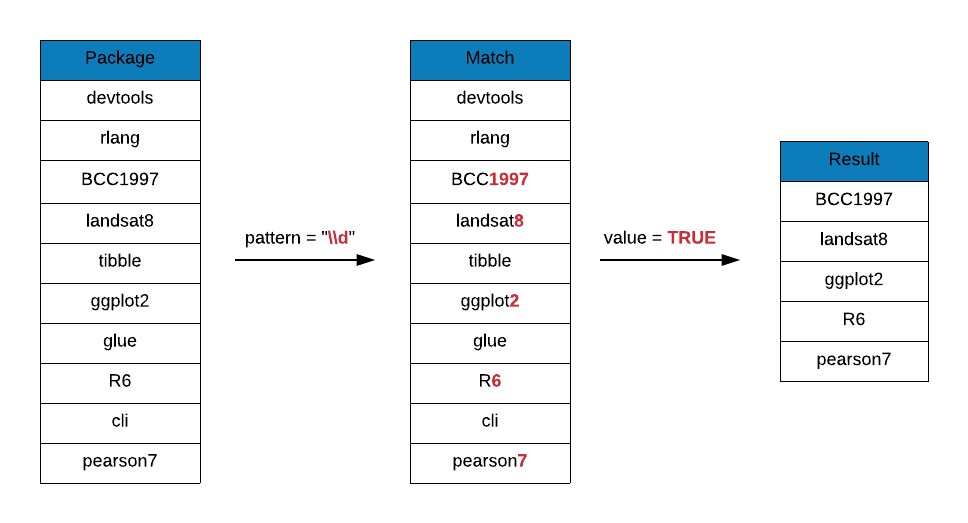
grep(x = r_packages, pattern = "\\d", value = TRUE)[1:50]
##  [1] "A3"              "ABCp2"           "abf2"            "Ac3net"
##  [5] "acm4r"           "ade4"            "ade4TkGUI"       "AdvDif4"
##  [9] "ALA4R"           "alphashape3d"    "alr3"            "alr4"
## [13] "ANN2"            "aods3"           "aplore3"         "APML0"
## [17] "aprean3"         "AR1seg"          "arena2r"         "arf3DS4"
## [21] "argon2"          "ARTP2"           "aster2"          "auth0"
## [25] "aws.ec2metadata" "aws.s3"          "B2Z"             "b6e6rl"
## [29] "base2grob"       "base64"          "base64enc"       "base64url"
## [33] "BaTFLED3D"       "BayClone2"       "BayesS5"         "bc3net"
## [37] "BCC1997"         "BDP2"            "BEQI2"           "BHH2"
## [41] "bikeshare14"     "bio3d"           "biomod2"         "Bios2cor"
## [45] "bios2mds"        "biostat3"        "bipartiteD3"     "bit64"
## [49] "Bolstad2"        "BradleyTerry2"
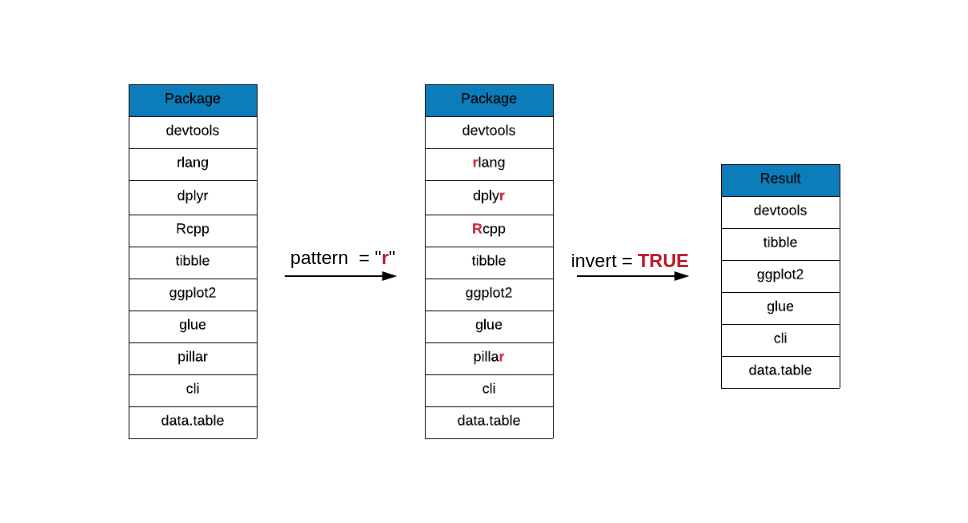
# invert
grep(x = r_packages, pattern = "\\d", value = TRUE, invert = TRUE)[1:50]
##  [1] "abbyyR"             "abc"                "abc.data"
##  [4] "ABC.RAP"            "ABCanalysis"        "abcdeFBA"
##  [7] "ABCoptim"           "abcrf"              "abctools"
## [10] "abd"                "abe"                "ABHgenotypeR"
## [13] "abind"              "abjutils"           "abn"
## [16] "abnormality"        "abodOutlier"        "ABPS"
## [19] "AbsFilterGSEA"      "AbSim"              "abstractr"
## [22] "abtest"             "abundant"           "ACA"
## [25] "acc"                "accelerometry"      "accelmissing"
## [28] "AcceptanceSampling" "ACCLMA"             "accrual"
## [31] "accrued"            "accSDA"             "ACD"
## [34] "ACDm"               "acebayes"           "acepack"
## [37] "ACEt"               "acid"               "ACMEeqtl"
## [40] "acmeR"              "ACNE"               "acnr"
## [43] "acopula"            "AcousticNDLCodeR"   "acp"
## [46] "aCRM"               "AcrossTic"          "acrt"
## [49] "acs"                "ACSNMineR"
In the next few examples, we will not use R package names data, instead we will use dummy data of Invoice IDs and see if they conform to certain rules such as:
-
they should include letters and numbers
-
they should not include symbols
-
they should not include space or tab
Non Digit Character
\D matches any non-digit character. Let us use it to remove invoice ids that include only numbers and no letters.
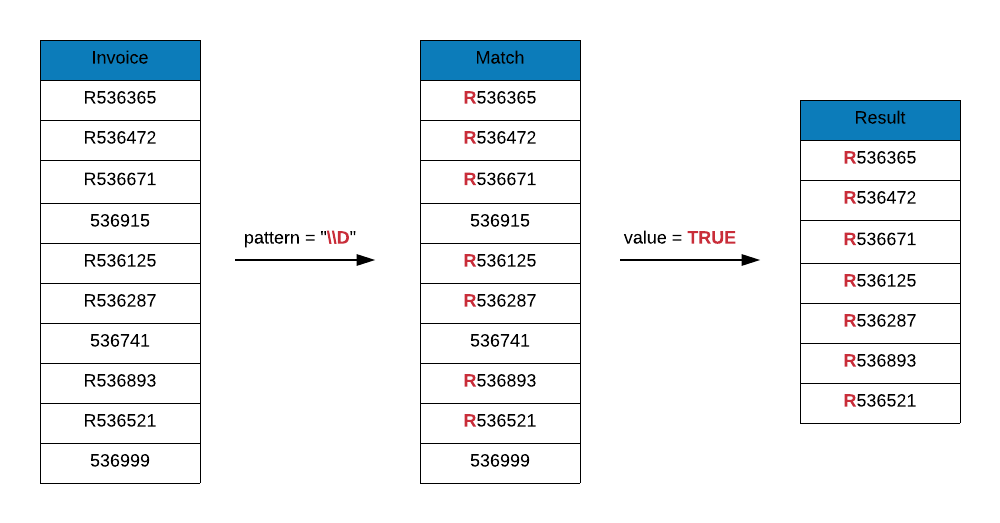
As you can see below, thre are 3 invoice ids that did not conform to the rules and have been removed. Only those invoice ids that have both letter and numbers have been returned.
invoice_id <- c("R536365", "R536472", "R536671", "536915", "R536125", "R536287",
                "536741", "R536893", "R536521", "536999")
grep(x = invoice_id, pattern = "\\D", value = TRUE)
## [1] "R536365" "R536472" "R536671" "R536125" "R536287" "R536893" "R536521"
# invert
grep(x = invoice_id, pattern = "\\D", value = TRUE, invert = TRUE)
## [1] "536915" "536741" "536999"
White Space Character
\s matches any white space character such as space or tab. Let us use it to detect invoice ids that include any white space (space or tab).
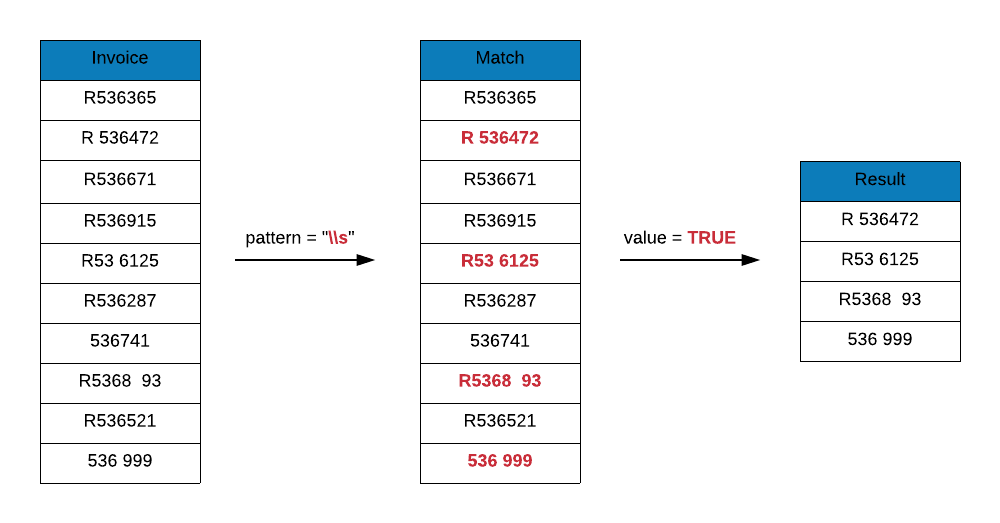
As you can see below, there are 4 invoice ids that include white space character.
grep(x = c("R536365", "R 536472", "R536671", "R536915", "R53 6125", "R536287",
           "536741", "R5368  93", "R536521", "536 999"),
     pattern = "\\s", value = TRUE)
## [1] "R 536472" "R53 6125" "R5368 93" "536 999"
grep(x = c("R536365", "R 536472", "R536671", "R536915", "R53 6125", "R536287",
           "536741", "R5368  93", "R536521", "536 999"),
     pattern = "\\s", value = TRUE, invert = TRUE)
## [1] "R536365" "R536671" "R536915" "R536287" "536741" "R536521"
Non White Space Character
\S matches any non white space character. Let us use it to remove any invoice ids which are blank or missing.
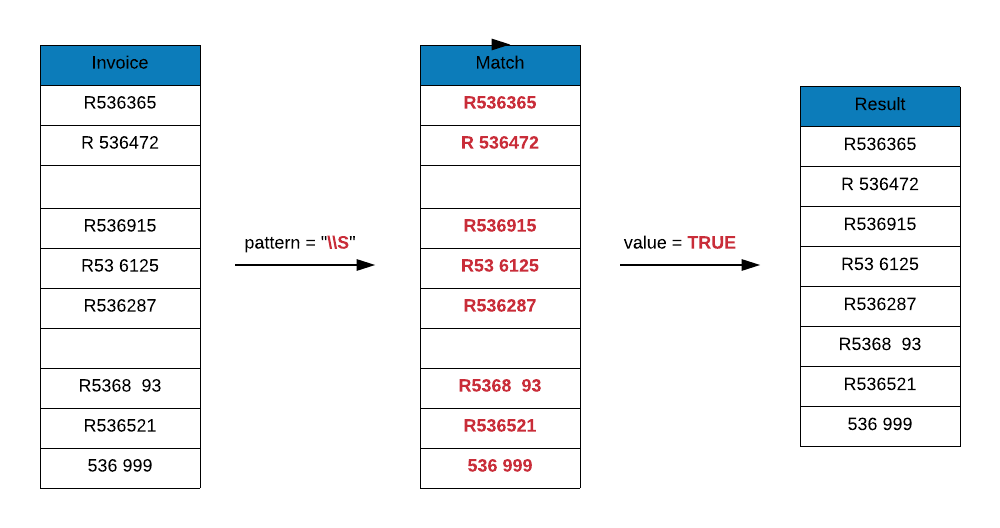
As you can see below, two invoice ids which were blank have been removed. If you observe carefully, it does not remove any invoice ids which have a white space character present, it only removes those which are completely blank i.e. those which include only space or tab.
grep(x = c("R536365", "R 536472", " ", "R536915", "R53 6125", "R536287",
           " ", "R5368  93", "R536521", "536 999"),
     pattern = "\\S", value = TRUE)
## [1] "R536365"   "R 536472"  "R536915"   "R53 6125"  "R536287"   "R5368  93"
## [7] "R536521"   "536 999"
# invert
grep(x = c("R536365", "R 536472", " ", "R536915", "R53 6125", "R536287",
           " ", "R5368  93", "R536521", "536 999"),
     pattern = "\\S", value = TRUE, invert = TRUE)
## [1] " " " "
Word Character
\w matches any word character i.e. alphanumeric. It includes the following:
-
a to z
-
A to Z
-
0 to 9
-
underscore(_)
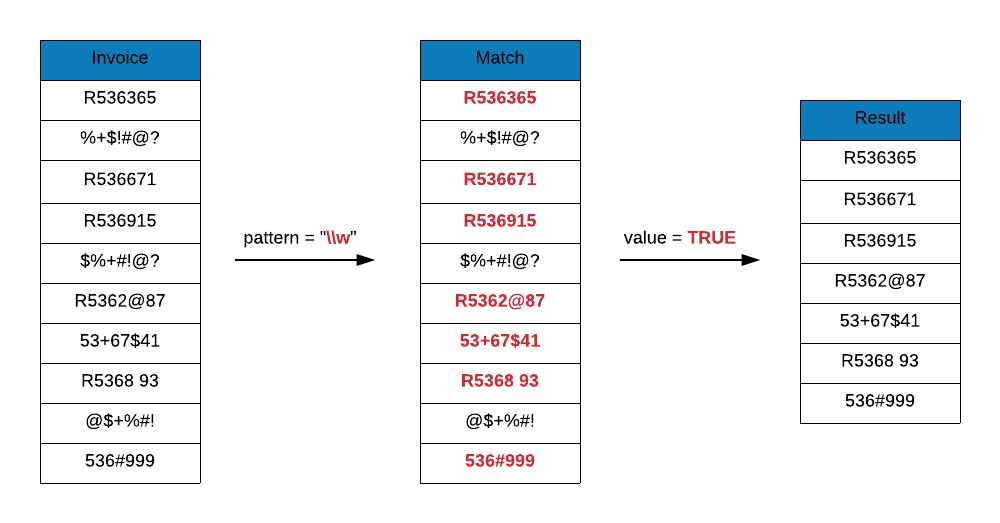
Let us use it to remove those invoice ids which include only symbols or special characters. Again, you can see that it does not remove those ids which include both word characters and symbols as it will match any string that includes word characters.
grep(x = c("R536365", "%+$!#@?", "R536671", "R536915", "$%+#!@?", "R5362@87",
           "53+67$41", "R536893", "@$+%#!", "536#999"),
     pattern = "\\w", value = TRUE)
## [1] "R536365" "R536671" "R536915" "R5362@87" "53+67$41" "R536893" "536#999"
# invert
grep(x = c("R536365", "%+$!#@?", "R536671", "R536915", "$%+#!@?", "R5362@87",
           "53+67$41", "R536893", "@$+%#!", "536#999"),
     pattern = "\\w", value = TRUE, invert = TRUE)
## [1] "%+$!#@?" "$%+#!@?" "@$+%#!"
Non Word Character
\W matches any non-word character i.e. symbols. It includes everything that is not a word character.
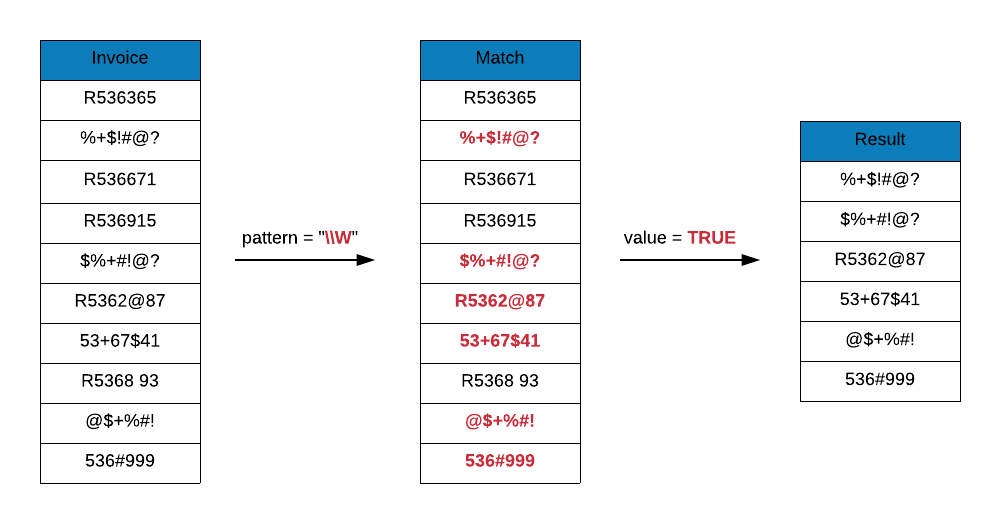
Let us use it to detect invoice ids that include any non-word character. As you can see only 4 ids do not include non-word characters.
grep(x = c("R536365", "%+$!#@?", "R536671", "R536915", "$%+#!@?", "R5362@87",
           "53+67$41", "R536893", "@$+%#!", "536#999"),
     pattern = "\\W", value = TRUE)
## [1] "%+$!#@?" "$%+#!@?" "R5362@87" "53+67$41" "@$+%#!" "536#999"
# invert
grep(x = c("R536365", "%+$!#@?", "R536671", "R536915", "$%+#!@?", "R5362@87",
           "53+67$41", "R536893", "@$+%#!", "536#999"),
     pattern = "\\W", value = TRUE, invert = TRUE)
## [1] "R536365" "R536671" "R536915" "R536893"
Word Boundary
\b and \B are similar to caret and dollar symbol. They match at a position called word boundary. Now, what is a word boundary? The following 3 positions qualify as word boundaries:
-
before the first character in the string
-
after the last character in the string
-
between two characters in the string
In the first 2 cases, the character must be a word character whereas in the last case, one should be a word character and another non-word character. Sounds confusing? It will be clear once we go through a few examples.
Let us say we are looking for package names beginning with the string stat. In this case, we can prefix stat with \b.
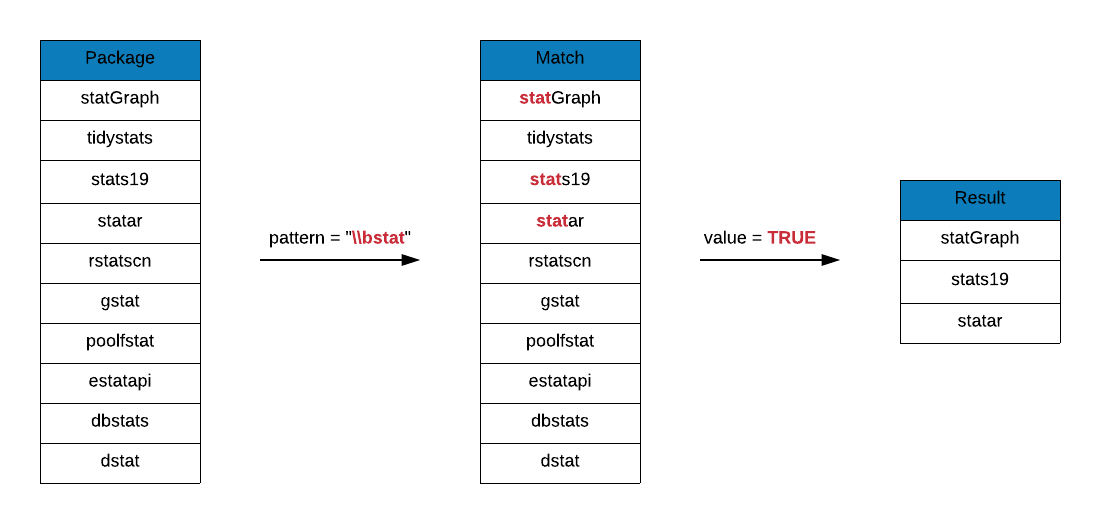
grep(x = r_packages, pattern = "\\bstat", value = TRUE)
##  [1] "haplo.stats"    "statar"         "statcheck"      "statebins"
##  [5] "states"         "statGraph"      "stationery"     "statip"
##  [9] "statmod"        "statnet"        "statnet.common" "statnetWeb"
## [13] "statprograms"   "statquotes"     "stats19"        "statsDK"
## [17] "statsr"         "statVisual"
Suffix \b to stat to look at all package names that end with the string stat.
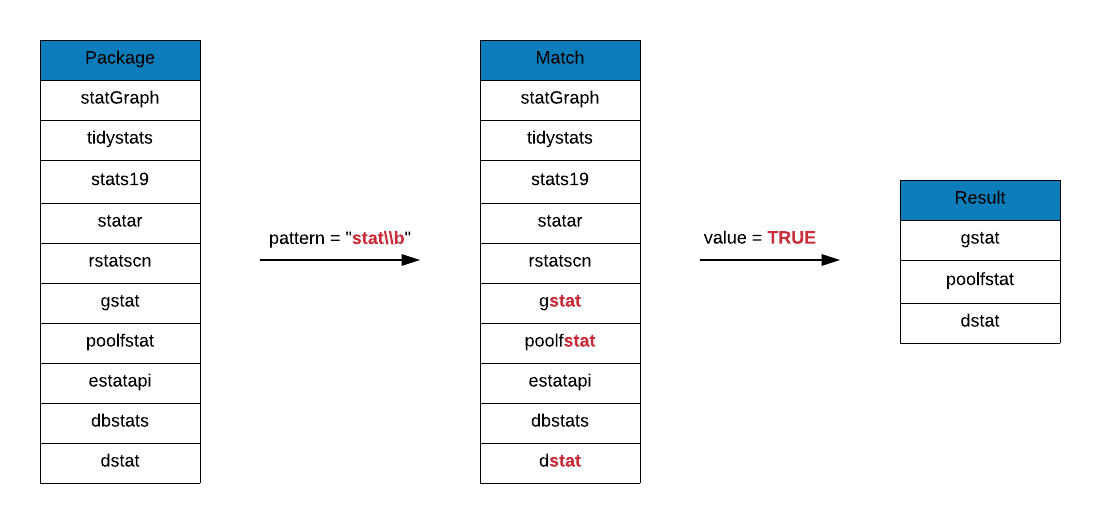
If you observe the output, you can find package names that do not end with the string stat. spatstat.data, spatstat.local and spatstat.utils do not end with stat but satisfy the third condition mentioned aboved for word boundaries. They are between 2 characters where t is a word character and dot is a non-word character.
grep(x = r_packages, pattern = "stat\\b", value = TRUE)
##  [1] "Blendstat"          "costat"             "dstat"
##  [4] "eurostat"           "gstat"              "hierfstat"
##  [7] "jsonstat"           "lawstat"            "lestat"
## [10] "lfstat"             "LS2Wstat"           "maxstat"
## [13] "mdsstat"            "mistat"             "poolfstat"
## [16] "Pstat"              "RcmdrPlugin.lfstat" "rfacebookstat"
## [19] "Rilostat"           "rjstat"             "RMTstat"
## [22] "sgeostat"           "spatstat"           "spatstat.data"
## [25] "spatstat.local"     "spatstat.utils"     "volleystat"
Do package names include the string stat either at the end or in the middle but not at the beginning? Prefix stat with \B to find the answer.
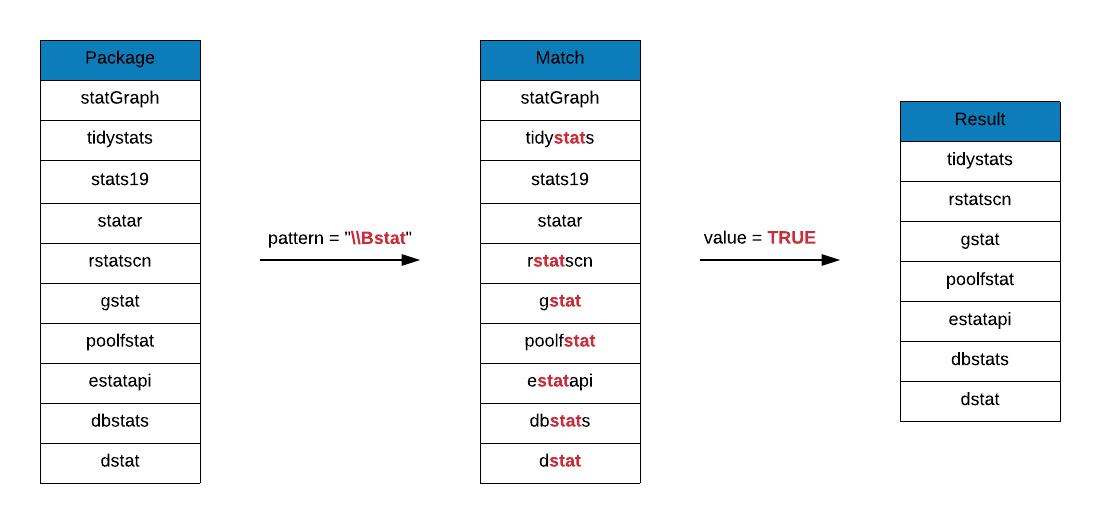
grep(x = r_packages, pattern = "\\Bstat", value = TRUE)
##  [1] "bigstatsr"          "biostat3"           "Blendstat"
##  [4] "compstatr"          "costat"             "cumstats"
##  [7] "curstatCI"          "CytobankAPIstats"   "dbstats"
## [10] "descstatsr"         "DistatisR"          "dlstats"
## [13] "dostats"            "dstat"              "estatapi"
## [16] "eurostat"           "freestats"          "geostatsp"
## [19] "gestate"            "getmstatistic"      "ggstatsplot"
## [22] "groupedstats"       "gstat"              "hierfstat"
## [25] "hydrostats"         "jsonstat"           "labstatR"
## [28] "labstats"           "lawstat"            "learnstats"
## [31] "lestat"             "lfstat"             "LS2Wstat"
## [34] "maxstat"            "mdsstat"            "mistat"
## [37] "mlbstats"           "mstate"             "multistate"
## [40] "multistateutils"    "ohtadstats"         "orderstats"
## [43] "p3state.msm"        "poolfstat"          "PRISMAstatement"
## [46] "Pstat"              "raustats"           "RcmdrPlugin.lfstat"
## [49] "readstata13"        "realestateDK"       "restatapi"
## [52] "rfacebookstat"      "Rilostat"           "rjstat"
## [55] "RMTstat"            "rstatscn"           "runstats"
## [58] "scanstatistics"     "sgeostat"           "sjstats"
## [61] "spatstat"           "spatstat.data"      "spatstat.local"
## [64] "spatstat.utils"     "TDAstats"           "tidystats"
## [67] "tigerstats"         "tradestatistics"    "unsystation"
## [70] "USGSstates2k"       "volleystat"         "wbstats"
Are there packages whose names include the string stat either at the beginning or in the middle but not at the end. Suffix \B to stat to answer this question.
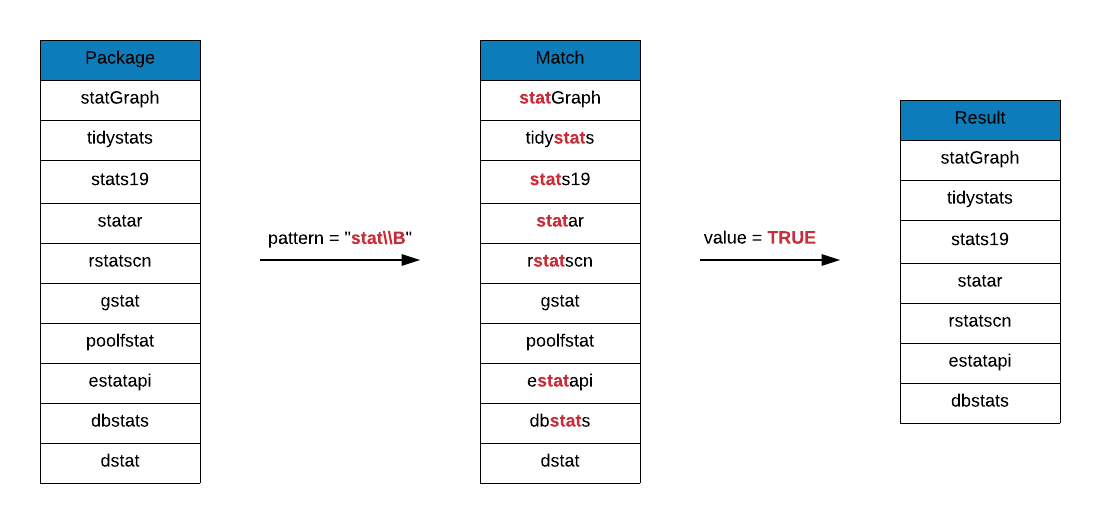
grep(x = r_packages, pattern = "stat\\B", value = TRUE)
##  [1] "bigstatsr"        "biostat3"         "compstatr"        "cumstats"
##  [5] "curstatCI"        "CytobankAPIstats" "dbstats"          "descstatsr"
##  [9] "DistatisR"        "dlstats"          "dostats"          "estatapi"
## [13] "freestats"        "geostatsp"        "gestate"          "getmstatistic"
## [17] "ggstatsplot"      "groupedstats"     "haplo.stats"      "hydrostats"
## [21] "labstatR"         "labstats"         "learnstats"       "mlbstats"
## [25] "mstate"           "multistate"       "multistateutils"  "ohtadstats"
## [29] "orderstats"       "p3state.msm"      "PRISMAstatement"  "raustats"
## [33] "readstata13"      "realestateDK"     "restatapi"        "rstatscn"
## [37] "runstats"         "scanstatistics"   "sjstats"          "statar"
## [41] "statcheck"        "statebins"        "states"           "statGraph"
## [45] "stationery"       "statip"           "statmod"          "statnet"
## [49] "statnet.common"   "statnetWeb"       "statprograms"     "statquotes"
## [53] "stats19"          "statsDK"          "statsr"           "statVisual"
## [57] "TDAstats"         "tidystats"        "tigerstats"       "tradestatistics"
## [61] "unsystation"      "USGSstates2k"     "wbstats"
Prefix and suffix \B to stat to look at package names that include the string stat but neither in the beginning nor in the end.
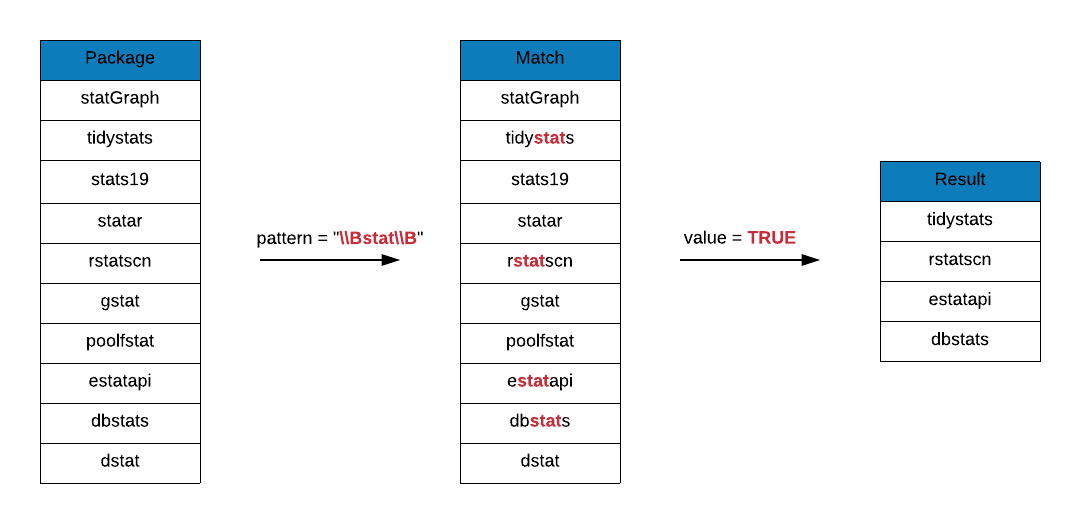
In the below output, you can observe that the string stat must be between two word characters. Those examples we showed in the case of \b where it was surrounded by a dot do not hold here.
grep(x = r_packages, pattern = "\\Bstat\\B", value = TRUE)
##  [1] "bigstatsr"        "biostat3"         "compstatr"        "cumstats"
##  [5] "curstatCI"        "CytobankAPIstats" "dbstats"          "descstatsr"
##  [9] "DistatisR"        "dlstats"          "dostats"          "estatapi"
## [13] "freestats"        "geostatsp"        "gestate"          "getmstatistic"
## [17] "ggstatsplot"      "groupedstats"     "hydrostats"       "labstatR"
## [21] "labstats"         "learnstats"       "mlbstats"         "mstate"
## [25] "multistate"       "multistateutils"  "ohtadstats"       "orderstats"
## [29] "p3state.msm"      "PRISMAstatement"  "raustats"         "readstata13"
## [33] "realestateDK"     "restatapi"        "rstatscn"         "runstats"
## [37] "scanstatistics"   "sjstats"          "TDAstats"         "tidystats"
## [41] "tigerstats"       "tradestatistics"  "unsystation"      "USGSstates2k"
## [45] "wbstats"
Character Classes
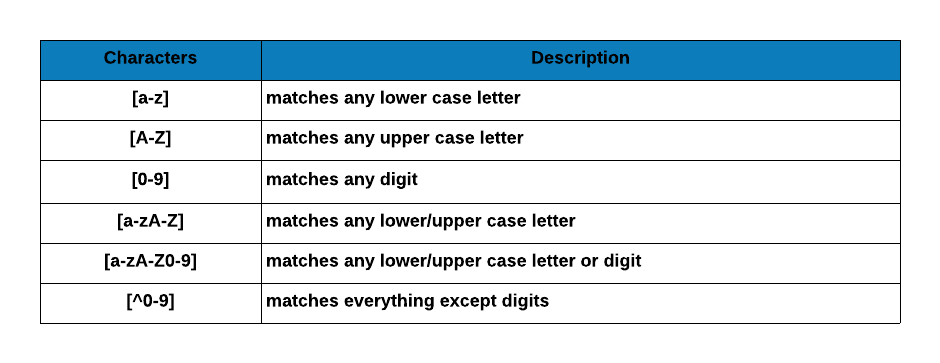
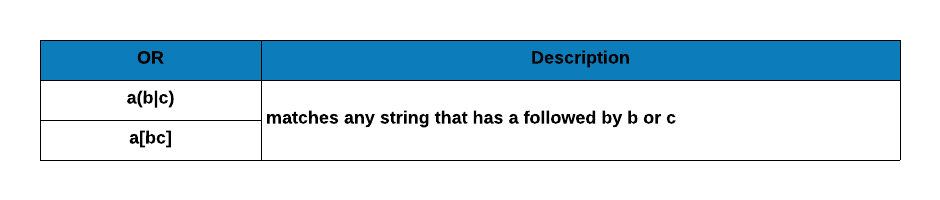
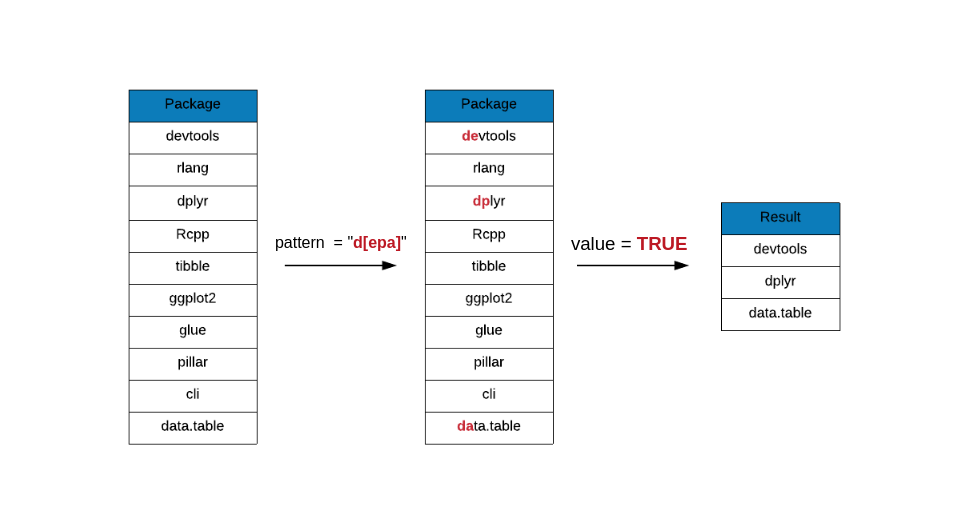
A set of characters enclosed in a square bracket ([]). The regular expression will match only those characters enclosed in the brackets and it matches only a single character. The order of the characters inside the brackets do not matter and a hyphen can be used to specify a range of charcters. For example, [0-9] will match a single digit between 0 and 9. Similarly, [a-z] will match a single letter between a to z. You can specify more than one range as well. [a-z0-9A-Z] will match a alphanumeric character while ignoring the case. A caret ^ after the opening bracket negates the character class. For example, [^0-9] will match a single character that is not a digit.
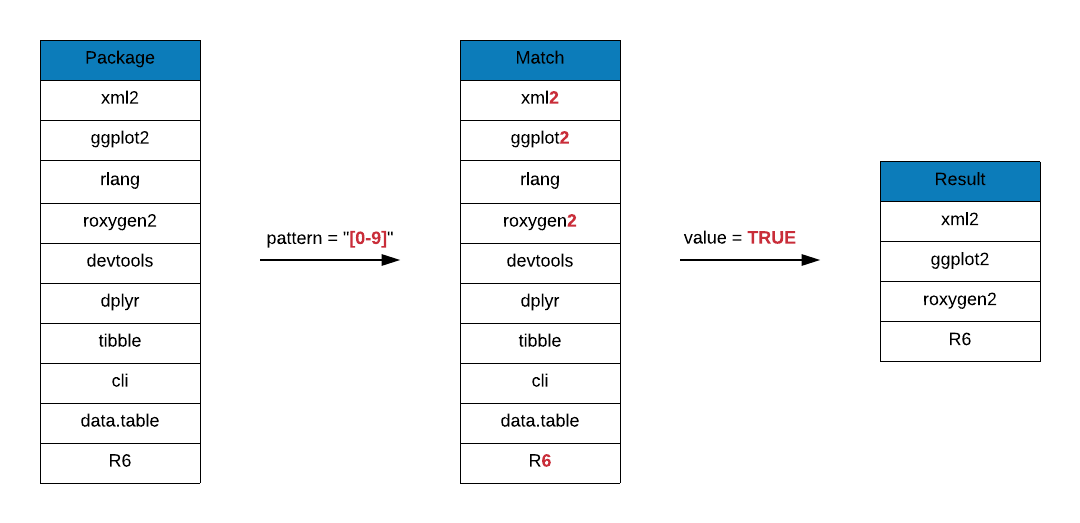 Let us go through a few examples to understand character classes in more detail.
# package names that include vowels
grep(x = top_downloads, pattern = "[aeiou]", value = TRUE)
## [1] "devtools"   "rlang"      "tibble"     "ggplot2"    "glue"
## [6] "pillar"     "cli"        "data.table"
# package names that include a number
grep(x = r_packages, pattern = "[0-9]", value = TRUE)[1:50]
##  [1] "A3"              "ABCp2"           "abf2"            "Ac3net"
##  [5] "acm4r"           "ade4"            "ade4TkGUI"       "AdvDif4"
##  [9] "ALA4R"           "alphashape3d"    "alr3"            "alr4"
## [13] "ANN2"            "aods3"           "aplore3"         "APML0"
## [17] "aprean3"         "AR1seg"          "arena2r"         "arf3DS4"
## [21] "argon2"          "ARTP2"           "aster2"          "auth0"
## [25] "aws.ec2metadata" "aws.s3"          "B2Z"             "b6e6rl"
## [29] "base2grob"       "base64"          "base64enc"       "base64url"
## [33] "BaTFLED3D"       "BayClone2"       "BayesS5"         "bc3net"
## [37] "BCC1997"         "BDP2"            "BEQI2"           "BHH2"
## [41] "bikeshare14"     "bio3d"           "biomod2"         "Bios2cor"
## [45] "bios2mds"        "biostat3"        "bipartiteD3"     "bit64"
## [49] "Bolstad2"        "BradleyTerry2"
# package names that begin with a number
grep(x = r_packages, pattern = "^[0-9]", value = TRUE)
## character(0)
# package names that end with a number
grep(x = r_packages, pattern = "[0-9]$", value = TRUE)[1:50]
##  [1] "A3"                "ABCp2"             "abf2"
##  [4] "ade4"              "AdvDif4"           "alr3"
##  [7] "alr4"              "ANN2"              "aods3"
## [10] "aplore3"           "APML0"             "aprean3"
## [13] "arf3DS4"           "argon2"            "ARTP2"
## [16] "aster2"            "auth0"             "aws.s3"
## [19] "base64"            "BayClone2"         "BayesS5"
## [22] "BCC1997"           "BDP2"              "BEQI2"
## [25] "BHH2"              "bikeshare14"       "biomod2"
## [28] "biostat3"          "bipartiteD3"       "bit64"
## [31] "Bolstad2"          "BradleyTerry2"     "brglm2"
## [34] "bridger2"          "c060"              "c212"
## [37] "c3"                "C443"              "C50"
## [40] "cAIC4"             "CARE1"             "CB2"
## [43] "cec2013"           "Census2016"        "Chaos01"
## [46] "choroplethrAdmin1" "cld2"              "cld3"
## [49] "clogitL1"          "CLONETv2"
# package names with only upper case letters
grep(x = r_packages, pattern = "^[A-Z][A-Z]{1, }[A-Z]$", value = TRUE)[1:50]
##  [1] "ABPS"    "ACA"     "ACCLMA"  "ACD"     "ACNE"    "ACSWR"   "ACTCD"
##  [8] "ADCT"    "ADDT"    "ADMM"    "ADPF"    "AER"     "AFM"     "AGD"
## [15] "AHR"     "AID"     "AIG"     "AIM"     "ALS"     "ALSCPC"  "ALSM"
## [22] "AMCP"    "AMGET"   "AMIAS"   "AMOEBA"  "AMORE"   "AMR"     "ANOM"
## [29] "APSIM"   "ARHT"    "AROC"    "ART"     "ARTIVA"  "ARTP"    "ASIP"
## [36] "ASSA"    "AST"     "ATE"     "ATR"     "AUC"     "AUCRF"   "AWR"
## [43] "BACA"    "BACCO"   "BACCT"   "BALCONY" "BALD"    "BALLI"   "BAMBI"
## [50] "BANOVA"
Case Studies
Now that we have understood the basics of regular expressions, it is time for some practical application. The case studies in this section include validating the following:
-
blood group
-
email id
-
PAN number
-
GST number
Note, the regular expressions used here are not robust as compared to those used in real world applications. Our aim is to demonstrate a general strategy to used while dealing with regular expressions.
Blood Group
According to Wikipedia, a blood group or type is a classification of blood based on the presence and absence of antibodies and inherited antigenic substances on the surface of red blood cells (RBCs).
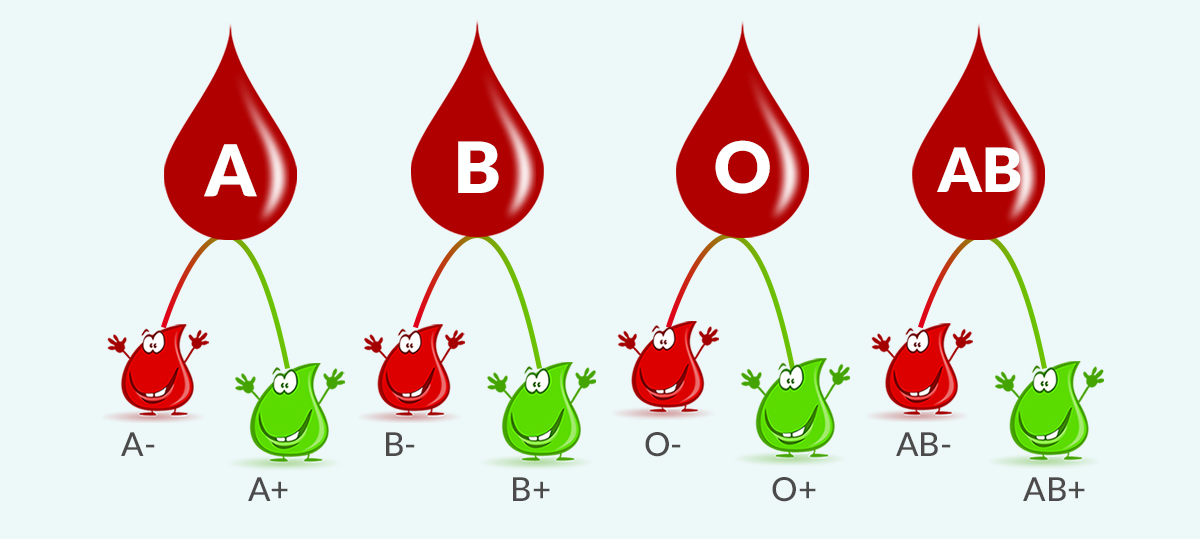
The below table defines the matching pattern for blood group and maps them to regular expressions.
-
it must begin with
A, B, AB or O
-
it must end with
+ or -
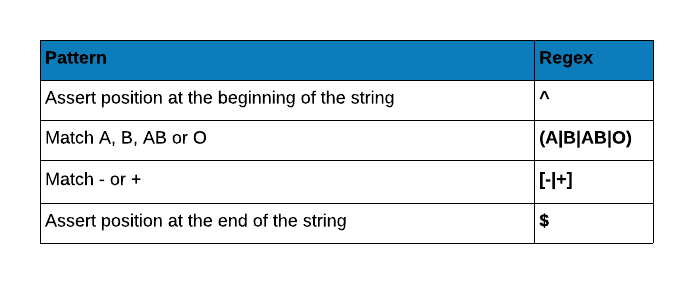
Let us test the regular expression with some examples.
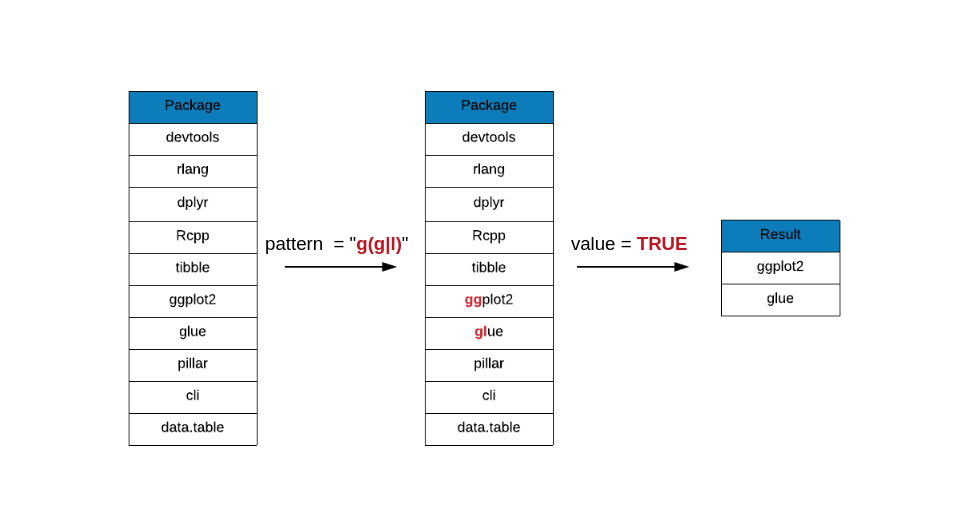
blood_pattern <- "^(A|B|AB|O)[-|+]$"
blood_sample <- c("A+", "C-", "AB+")
grep(x = blood_sample, pattern = blood_pattern, value = TRUE)
## [1] "A+" "AB+"
email id
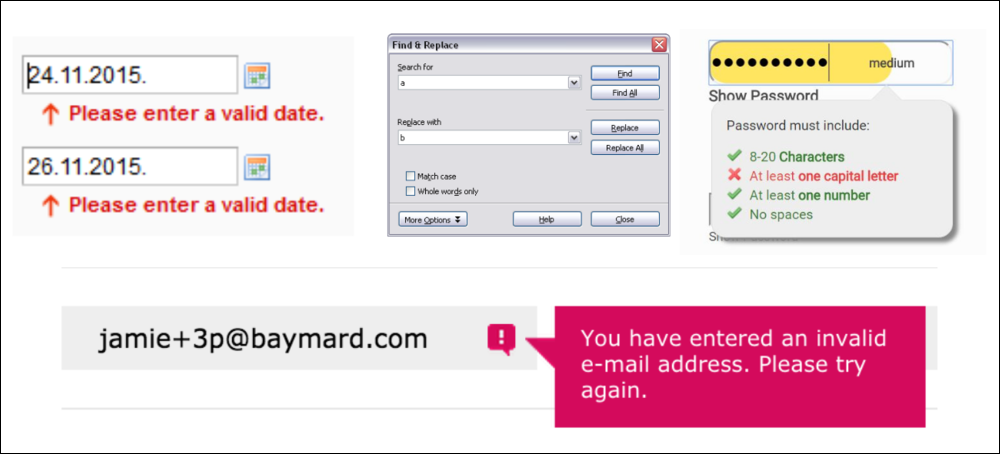
Nowadays email is ubiquitous. We use it for everything from communication to registration for online services. Wherever you go, you will be asked for email id. You might even be denied a few services if you do not use email. At the same time, it is important to validate a email address. You might have seen a message similar to the below one when you misspell or enter a wrong email id. Regular expressions are used to validate email address and in this case study we will attempt to do the same.

First, we will create some basic rules for simple email validation:
-
it must begin with a letter
-
the id may include letters, numbers and special characters
-
must include only one @ and dot
-
the id must be to the left of @
-
the domain name should be between @ and dot
-
the domain extension should be after dot and must include only letters
In the below table, we map the above rules to general expression.
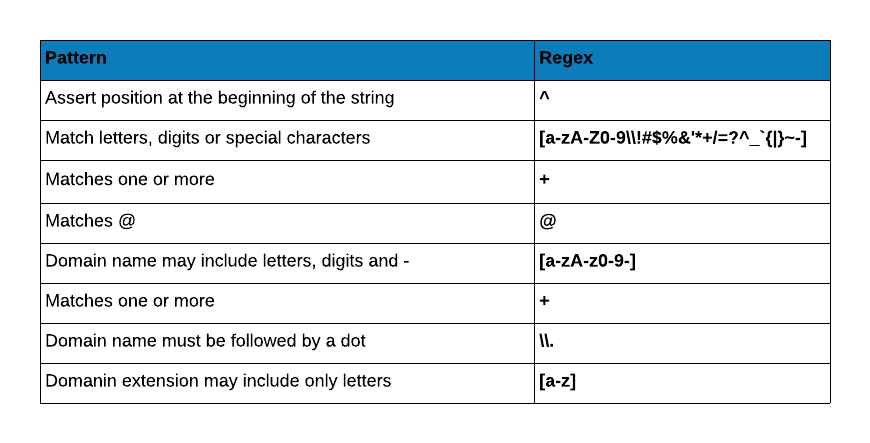
Let us now test the regular expression with some dummy email ids.
email_pattern <- "^[a-zA-Z0-9\\!#$%&'*+/=?^_`{|}~-]+@[a-zA-Z0-9-]+\\.[a-z]"
emails <- c("test9+_A@test.com", "test@test..com", "test-test.com")
grep(x = emails, pattern = email_pattern, value = TRUE)
## [1] "test9+_A@test.com"
PAN Number Validation
PAN (Permanent Account Number) is an identification number assigned to all taxpayers in India. PAN is an electronic system through which, all tax related information for a person/company is recorded against a single PAN number.
Structure
-
must include only 10 characters
-
the first 5 characters are letters
-
the next 4 characters are numerals
-
the last character is a letter

-
the first 3 characters are a sequence from AAA to ZZZ
-
the 4th character indicates the status of the tax payer and shold be one of A, B, C, F, G, H, L, J, P, T or E
-
the 5th character is the first character of the last/surname of the card holder
-
the 6th to 10th character is a sequnce from 0001 to 9999
-
the last character is a letter

In the below table, we map the pattern to regular expression.
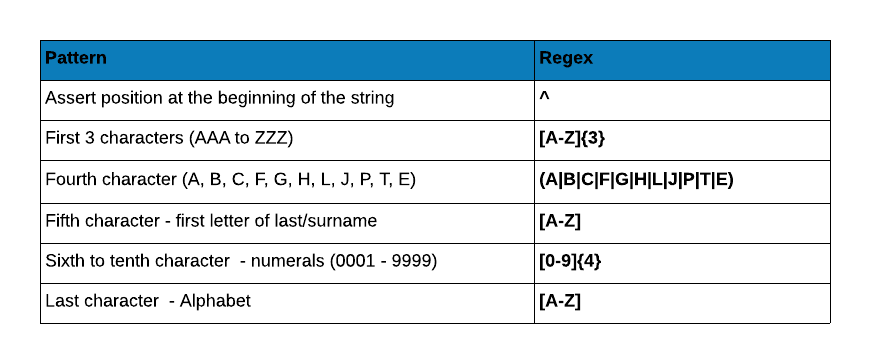
Let us test the regular expression with some dummy PAN numbers.
pan_pattern <- "^[A-Z]{3}(A|B|C|F|G|H|L|J|P|T|E)[A-Z][0-9]{4}[A-Z]"
my_pan <- c("AJKNT3865H", "AJKNT38655", "A2KNT3865H", "AJKDT3865H")
grep(x = my_pan, pattern = pan_pattern, value = TRUE)
## character(0)
GST Number Validation
In simple words, Goods and Service Tax (GST) is an indirect tax levied on the supply of goods and services. This law has replaced many indirect tax laws that previously existed in India. GST identification number is assigned to every GST registed dealer.

Structure
Below is the format break down of GST identification number:
-
it must include 15 characters only
-
the first 2 characters represent the state code and is a sequence from 01 to 35
-
the next 10 characters are the PAN number of the entity
-
the 13th character is the entity code and is between 1 and 9
-
the 14th character is a default alphabet, Z
-
the 15th character is a random single number or alphabet
In the below table, we map the pattern to regular expression.
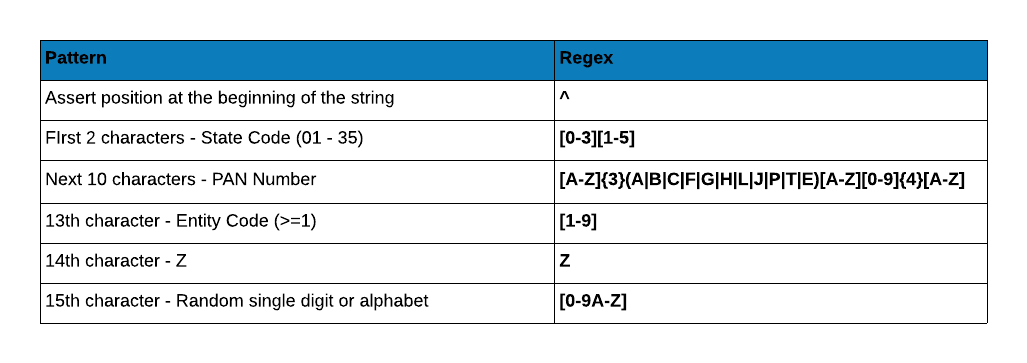
Let us test the regular expression with some dummy GST numbers.
gst_pattern <- "[0-3][1-5][A-Z]{3}(A|B|C|F|G|H|L|J|P|T|E)[A-Z][0-9]{4}[A-Z][1-9]Z[0-9A-Z]"
sample_gst <- c("22AAAAA0000A1Z5", "22AAAAA0000A1Z", "42AAAAA0000A1Z5",
                "38AAAAA0000A1Z5", "22AAAAA0000A0Z5", "22AAAAA0000A1X5",
                "22AAAAA0000A1Z$")
grep(x = sample_gst, pattern = gst_pattern, value = TRUE)
## [1] "22AAAAA0000A1Z5"